



| Brand | DKARDU |
|---|---|
| Manufacturer | DKARDU |
| Model | NR-US-334A |
| Part Number | NR-US-334A |
| Compatible Devices | pc |
| Number of Items | 4 |
| Batteries included | No |
| Batteries Required | No |
| Number of Ports | 1 |
| Material Type | Metal, Plastic |
| Manufacturer | DKARDU |
| Item model number | NR-US-334A |
| Parcel Dimensions | 7.7 x 5.31 x 1.7 cm; 40 g |
| ASIN | B09WV5JMKS |
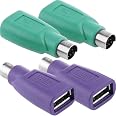
PS/2 to USB A Adapter - Male to Female Keyboard & Mouse Adapter, Replacement PS2 Adapter, 4 Pack
Purchase options and add-ons
| Compatible devices | pc |
| Specific uses for product | PS/2 to USB Adapter for Computer Mouse and Keyboard |
| Connector type | USB Type A |
| Colour | Usb F to Ps/2 M |
| Brand | DKARDU |
About this item
- Adapter Function: When your computer does not have many USB ports, a USB to PS/2 adapter can help you easily connect to the computer.
- Application: The USB interface is only used to connect a computer mouse or keyboard, and cannot be connected to other devices. The product is of good quality and can be easily installed without a software driver.
- Use Matters: Since the PS/2 to USB adapter does not support hot-plugging, please turn off the computer power first! Then connect the PS/2 to USB adapter. After the connection is successful, turn on the computer power. If the middle mouse button is not sensitive, please turn off the computer first and then turn it on again.
- Please Note: Please check whether your mouse or keyboard has a chip before purchasing, if not, this adapter may not be compatible with your device. There are many kinds of USB interface devices.
- Package Content: 4 pcs PS2 male to USB A female adapter.
Check Compatibility
Frequently bought together

More items to explore
BENFEI DisplayPort to DVI, Gold-Plated DP to DVI Adapter (Male to Female) Compatible for Lenovo, Dell, HP and Other BrandFREE Shipping by 鶹Get it by Saturday, Mar 21
SinLoon SATA Female to 40 Pin Male 3.5 Inch IDE Adapter for PC and Mac Computer Hard Drive Interface (SATA F/3.5 M Big)FREE Shipping by 鶹Get it by Saturday, Mar 21
Brand in this category on 鶹
Product information
Technical Details
Additional Information
| Date First Available | March 30 2022 |
|---|---|
| Customer Reviews |
4.2 out of 5 stars |
| 鶹 Rank |
|
Feedback
Product details
- Parcel Dimensions : 7.7 x 5.31 x 1.7 cm; 40 g
- Manufacturer : DKARDU
- ASIN : B09WV5JMKS
- Item model number : NR-US-334A
- Country/Region of origin : China
- Customer Reviews:
Product description
This product can easily realize the transmission between PS/2 and USB interface, connect the keyboard and mouse of the USB interface to the PS/2 interface of the host, thus saving the channel for the computer lacking the USB interface.
Specification:
Connector A: USB type A female
Connector B: PS/2 male
Material: metal + plastic
Color: purple / green
Reminder:
1. Some keyboards cannot be used, and there will be compatible keyboards and mice for chip conversion. Some can be used without chip conversion, while others cannot be used! If you've used this adapter, or know your keyboard and mouse have chips, you can buy it!
2. Not all USB mice can be used with this adapter. In fact, only the early USB1.0/1.1 interface can be converted into a PS/2 interface through a converter. If your mouse is USB2.0, we do not recommend you to buy this converter! Due to USB2.0/USB3.0 protocol and functional reasons, it cannot be converted to PS/2 interface. Before buying, check whether your keyboard has a rate of return (125Hz/500Hz/1000Hz) adjustment function, and the USB keyboard keys can be used without conflicts, all of which are USB2.0 interface functions.
Package Included:
4 x PS2 male to USB A female adapter
Brands in this category on 鶹
Customer reviews
Customers say
Generated from the text of customer reviewsSelect to learn more
Top reviews from Canada
There was a problem filtering reviews. Please reload the page.
- Reviewed in Canada on April 15, 2025Verified PurchaseMy wife was able to connect to her old computer that still had Windows 98. Both the connection for the mouse and the key board (both have USB connections) functioned flawlessly.
- Reviewed in Canada on May 28, 2025Verified Purchasedoes exactly what it's supposed to do. zero issues.
- Reviewed in Canada on June 23, 2024Verified PurchaseSome USB keyboards speak PS/2, but most don't. If yours doesn't (which is most likely), this product won't work. If your keyboard does speak PS/2 however, you shouldn't have any issues.
- Reviewed in Canada on July 19, 2024Verified PurchaseJust what I need, my husband got a 300 cd player and need this adapter for the keyboard so he can label all 300 ( good luck and have fun honey)
- Reviewed in Canada on May 6, 2025Verified PurchaseThese did not work for me. I tried all four to adapt for my keyboard but no luck.
-
Reviewed in Canada on December 20, 2023Verified PurchaseTrès bon produits
-
Reviewed in Canada on March 9, 2025Verified Purchasearrivé dans les temps , parfait
- Reviewed in Canada on August 5, 2024Verified PurchaseWorks on Older Systems as long as not booted in DOS mode , so Windows only device adapters.
Top reviews from other countries
John MitchellReviewed in the United States on February 4, 20265.0 out of 5 stars Problem could be Windows 11 or some else.
Verified PurchaseI'm going to give them 5 stars even though I haven't got them to work yet.
Could be Windows 11, could be the gaming mouse, it will light up using them, just not move.
Could be settings need to be changed. I bought them more for a hobby and not a need so I'll come back to them and try them on another computer, different OS, keyboard, and mouse.
5 stars because they seem to be of good quality, fits pst2 ports and usb port.
Tony I.Reviewed in the United States on August 4, 20254.0 out of 5 stars Beware of the type of mouse you have.
Verified PurchaseThe USB to PS/2 works perfectly with my keyboard, however the one for the mouse, doesn't work. My mouse has a LED light at the bottom that tracks movement. The adapter does not provide any power to the mouse, hence the LED fails to light rendering the mouse inoperable. If you have the old style mouse with the roller ball instead of the LED, then you should be fine.
Kenny BReviewed in the United States on May 30, 20251.0 out of 5 stars No connectivity in the pins these do not work
Verified PurchaseThese do not work. I tried woth 4 usb keyboards and 4 mouse on 6 different computers. Maybe im doing something wrong. I even ran a test signal through the usb and got zero response on the pins and that's woth all 4 adaptors that came in the package. I guess I wasted 6 dollars for nothing
Product summary presents key product information
Keyboard shortcut
Shift
+
Alt
+
opt
+
D
Product Summary: DKARDU PS/2 to USB A Adapter - Male to Female Keyboard & Mouse Adapter, Replacement PS2 Adapter, 4 Pack
From DKARDU
About this Item
- Adapter Function: When your computer does not have many USB ports, a USB to PS/2 adapter can help you easily connect to the computer.
- Application: The USB interface is only used to connect a computer mouse or keyboard, and cannot be connected to other devices. The product is of good quality and can be easily installed without a software driver.
- Use Matters: Since the PS/2 to USB adapter does not support hot-plugging, please turn off the computer power first! Then connect the PS/2 to USB adapter. After the connection is successful, turn on the computer power. If the middle mouse button is not sensitive, please turn off the computer first and then turn it on again.
- Please Note: Please check whether your mouse or keyboard has a chip before purchasing, if not, this adapter may not be compatible with your device. There are many kinds of USB interface devices.
- Package Content: 4 pcs PS2 male to USB A female adapter.
Product description
Feedback
Did you find this product summary feature useful?


